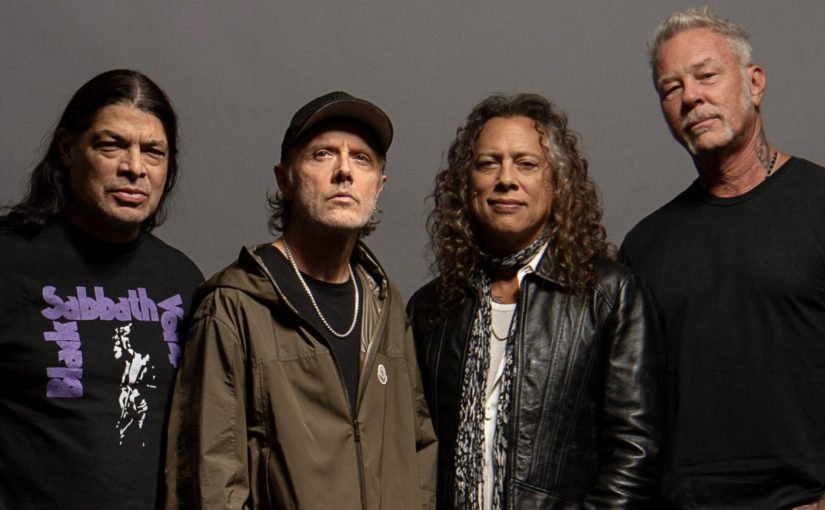
Metallica’s frontman, James Hetfield said something profoundly hypocritical recently that’s been making the rounds on the music press sites of the internet. His comment was made from the Sphere stage in Las Vegas on October 10, 2026, during the band’s residency there. I wanted to comment on it, so I’m going to. Here’s what Hetfield said:
“Unless you live in Vegas, you’ve come a long way to spend some time with Metallica. And I just gotta say: Metallica is not here, like some other entertainers, to influence you with their bullshit. We are here to forget about all the outside shit. Metallica’s agenda is love, energy and heavy music, baby!”
Let’s start with what is perfectly okay with this stance. It is perfectly okay for an artist to choose not talk about politics–either directly or indirectly. Many songwriters are comfortable giving voice to political positions in the lyrics to their songs but not outside of them. They opt to let the songs do the talking. That’s a coherent position and a wise one. Few artists are great at articulating what’s good about their own work. They’re too close to it. Some artists take no real interest in politics. They really do want to create escapist entertainment. Some other artists avoid any discussion of politics, in or outside of their songs, for fear of dividing their audience. That’s cowardly and tactical, but understandable.
Some artists express a range of views, none of them necessarily their own, in their work under the guise of personas. The speaker of a poem, as your literature teacher surely taught you, isn’t synonimous with author of the poem. The same goes for song lyrics. Hetfield, the chief lyricist for Metallica, uses personas extensively in his work, often employing, as we shall see, multiple personas in a single song.
I used to work with some people in public relations. My boss at the time, who was head of public relations, said something that has served me well, personally and professionally. It was this: “In PR, often, the best thing to say is nothing.” Hetfield had that option. No one forced him to proclaim that Metallica is not in the business of influencing you, implying in the very language of it that doing so is a bad thing. No one made Hetfield stand up for art as escapist entertainment. Such a position is ubiquitous; it needs no champion. But Hetfield, given the lyrics he writes, is an odd person to be making this claim, which is what prompted me to respond.
(I submit to you that all art is political, overtly or covertly, intentionally or unintentionally. By that I mean that all art has a political dimension, even art that attempt to avoid having one. You don’t have to always look at art through the lens of political ideas, but you always can. I’m not going to defend that position in this post. I’m just going to lay it out on the table so you know where I’m coming from.)
It should be clear to anyone that many, perhaps most, of Metallica’s song are overtly political. Consider “Disposable Heroes” from Master of Puppets (1986). We start off from a soldier’s first-person perspective:
“Bodies fill the fields I see,
hungry heroes end,
No one to play soldier now,
no one to pretend,
Running blind through killing fields,
bred to kill them all,
Victim of what said should be,
A servant ’til I fall”
Then we switch to a different point of view, perhaps from the decisions makers in the conflict:
“Soldier boy, made of clay
Now an empty shell
Twenty one, only son
But he served us well
Bred to kill, not to care
Do just as we say
Finished here, greetings death
He’s yours to take away”
The third voice in the song is an authority figure closer to hand, perhaps the person in direct command of the soldier:
“Back to the front
You will do what I say, when I say
Back to the front
You will die when I say, you must die
Back to the front
You coward
You servant
You blind man”
The full lyrics of the song are pretty chilling in places. Whatever you take to be the thesis of the song, it’s clear that it could support many. It’s also clear that love isn’t among them. As a 16-year-old kid, I took it as an anti-war song. And, as a 56-year old man, I still do. The soldier is a pawn in a violent game. He’s expendable.
Jumping to the title track from Ride the Lightening (1984), we are met with an overtly political objection to capital punishment perspective of a person soon to be electrocuted:
“Guilty as charged
But damn it, it ain’t right
There’s someone else controlling me
Death in the air
Strapped in the electric chair
This can’t be happening to me
Who made you god to say,
“I’ll take your life from you?”
The speaker of the song makes several quite overtly political and philosophical claims. First, though he admits he’s guilty, he still maintains that be executed as punishment for his crimes is wrong. He also floats the idea that his actions are not his own. Is he possessed? Insane? Perhaps he’s simply a believer in strict determinism. That’s not an unusual point of view in many philosophical circles. But the final line from this quoted passage is the one that lands with full force. To assume power over life and death is the role traditionally associated with gods. And it is dangerous to transfer that godlike power to governments.
It’s explicitly political. I mean, c’mon, James.
A lot of Metallica’s songs seek to describe various mental states from the inside, often without any overt claim about what to make of such descriptions. They explore different subjectivities–addiction, madness, rage, etc. They often involve being trapped (e.g., in an insane asylum, in an addiction, under ice). These are certainly open to political interpretations. But there’s less to hang your hat on. The songs gives you raw materials, but no solid directions about what to build with them.
I saw Metallica live twice on the tour for …And Justice for All (1988), which is one of the high points of the band when it comes to political messaging, starting with the cover art:
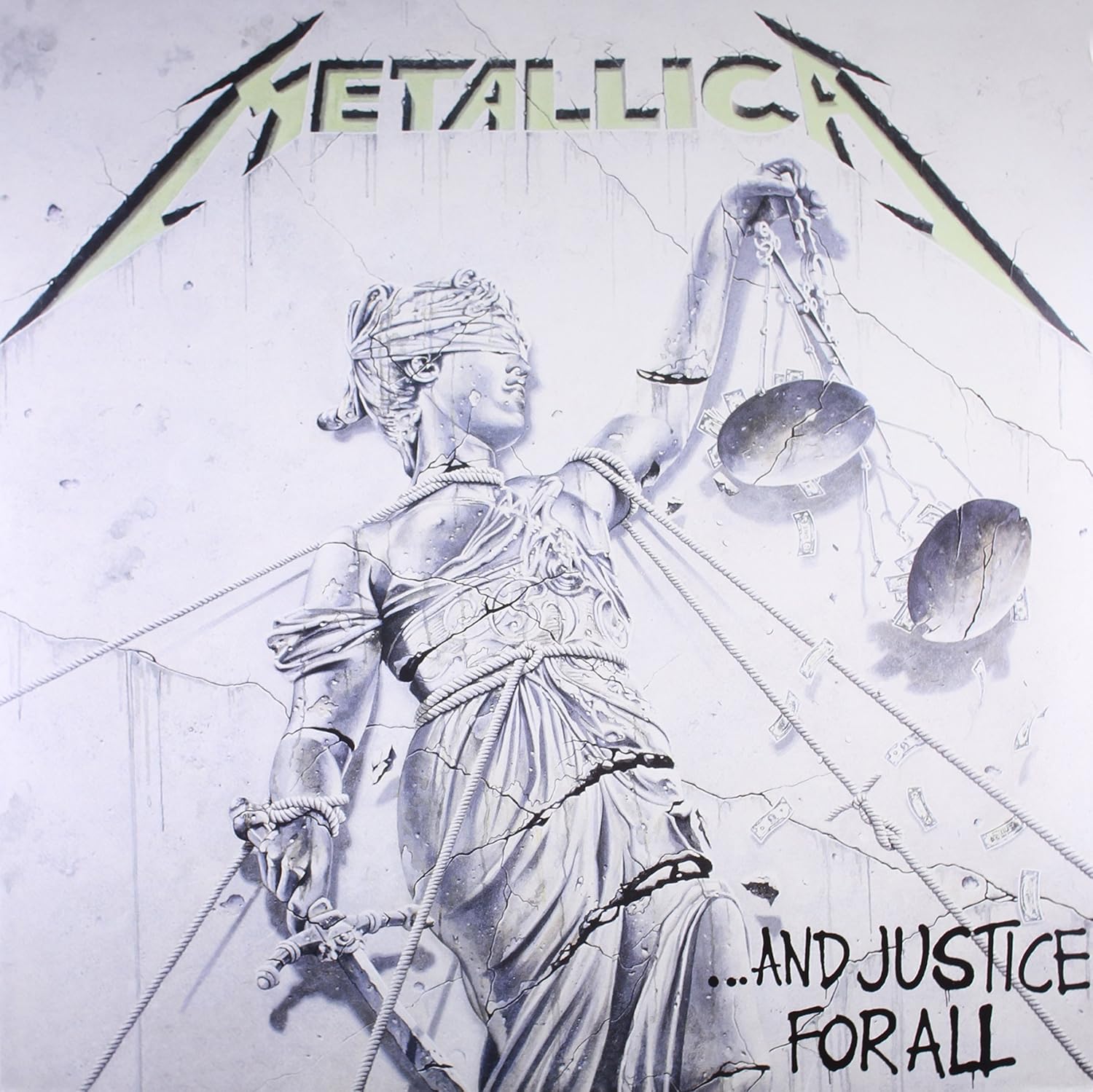
Designer Stephen Gorman designed the cover based on James and Lars’ idea. The woman in the design is based on a sculpture of Lady Justice in Frankfurt, Germany. The idea of “Lady Justice” is a common one in sculpture. She’s typical depicted, as above, with scales and a sword.
Of course, the devil is in the details. Here, Gorman has added ropes binding Lady Justice. Cracks are forming in her and in the wall behind her. She’s depicted at an angle, further emphasizing that she might very soon topple over. And money is spilling from her scales. The metaphorical and even allegorical significance of these elements should be plain to anyone. Metallica used a version of this statue as a stage prop on the tour for …And Justice for All. The lights would go down between some songs and, when they came back up, another piece of the statue, which had been divided into sections, would appear, until is was fully erected, ropes and all. Then, at a certain point in the show, they pulled it down. This was quite a dramatic move for a band who had, early in their career, had been opposed to any sort of stage props or choreography.
The cover art is, in many ways, an accurate prelude to the lyrical content of the album, which is more overtly political than that of previous albums, and introduces some new themes along with the old. The first verse of the title track (Track 2 of the album) complains about the influence of money in politics and its corrosive effect on the justice system:
“Halls of justice painted green
Money talking
Power wolves beset your door
Hear them stalking
Soon you’ll please their appetite
They devour
Hammer of justice crushes you
Overpower”
“Blackened,” the powerful opening track of …And Justice for All and the opening number when I saw them on tour, introduces environmentalism as a concern:
“Blackened is the end
Winter it will send
Throwing all you see
Into obscurity
Death of Mother Earth
Never a rebirth
Evolution’s end
Never will it mend
Never”
The Wrap Up
As an artist, opting not to talk about politics is a cowardly but understandable move. But calling out other artists for talking about politics is also a form of talking about politics. Thus, the statement “Bands shouldn’t talk about politics,” or, in Hetfield’s vernacular artists shouldn’t try “to influence you with their bullshit” is itself a political statement, one calling for quietism. In the case of Metallica, given the lyrical content of their songs, it not only self-contradictory, it’s also deeply hypocritical.
Honestly, I don’t care what Hetfield, personally, thinks about politics. While he avoids talking about it directly, it’s not hard to guess that he’s somewhere on the right. While I didn’t delve into it here, there’s a strong libertarian point-of-view in many of his lyrics. That’s not uncommon in a lot of metal. Resistance to authority, rebellion, and a type of rugged, loner individualism are common themes in metal lyrics. Hetfield isn’t the only guy in the band. Kirk Hammett is on the left and has publicly condemned Donald Trump. Kirk has always struck me as the surfer hippie in the band. That and his incredible guitar playing are a charming combination.
Metallica, like any good band, is more than the sum of its parts. The politics that emerge from a close reading of Metallica’s lyrics are more interesting and more varied than those of any particular member of the band. That’s part of the reason that I feel fine about liking several of their albums, even though I know Hetfield can, and will, say some stupid shit from the stage once in a while.